
Features
External API: join links and scores
The external API lets another platform run events on QuizWhizzer end to end: send each participant into a game under the name your system knows them by, then pull the standings back out and match results to your records by that name.
The external API is available for accounts running events at larger scale. If you'd like access enabled for your account, email tim@quizwhizzer.com.
Getting your API key
Once API access is enabled for your account, go to Account Settings and find the API access section. Click Generate key and copy the key straight away, since it is only shown once. Generating a new key replaces the old one immediately, so you can also use this to rotate a key that has been exposed.
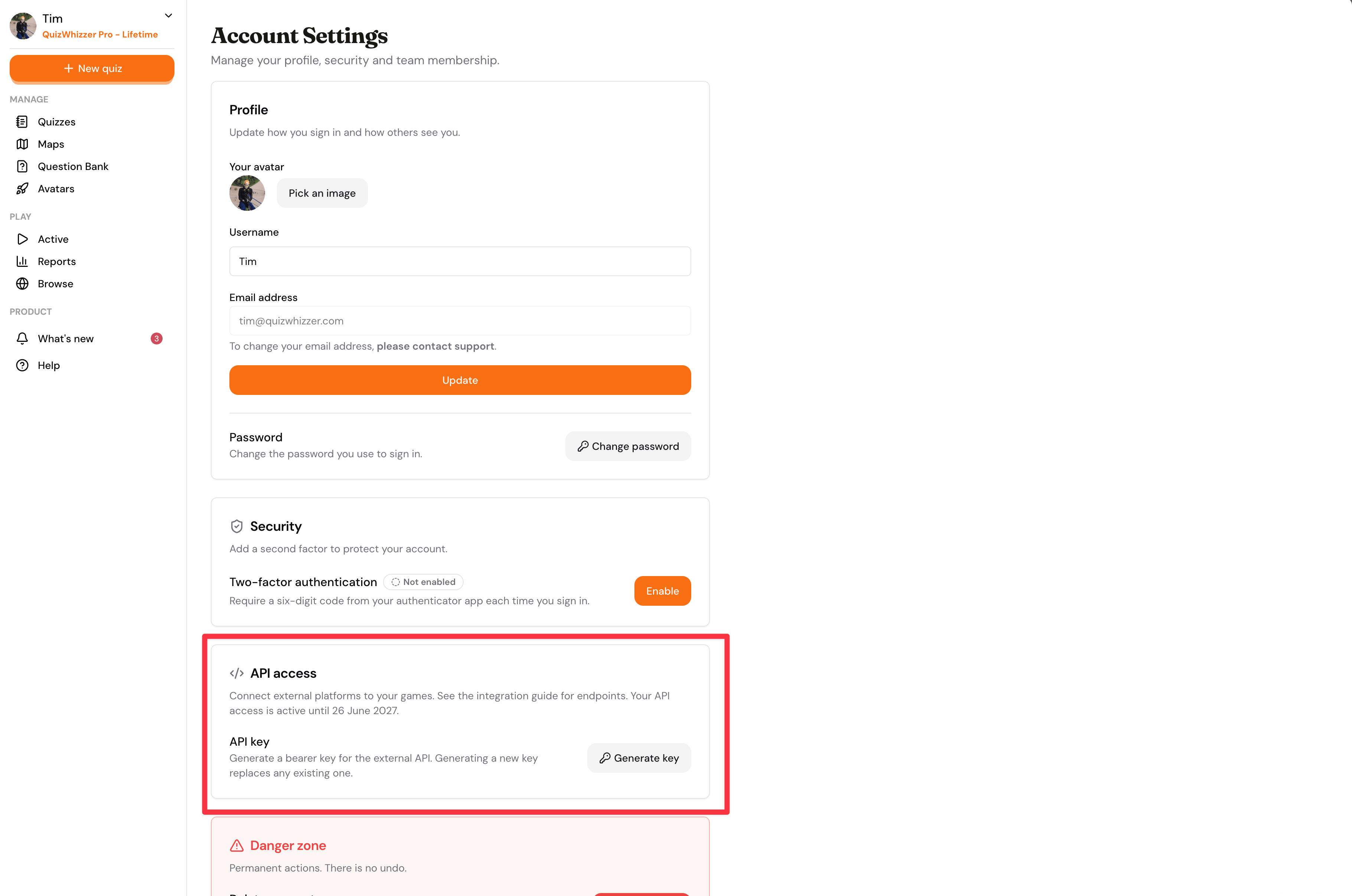
Every API request sends the key as a bearer token:
Authorization: Bearer qw_xxxxxxxxxxxxxxxxxxxx
Your key can only read games hosted by your own account.
Tracking participants across systems
The name parameter on a join link is how you connect a QuizWhizzer player to a participant record in your own system. Build a join link per participant using the game's access code and the participant's name as it appears in your system:
https://quizwhizzer.com/play?code=12971&name=Jordan%20Smith
Participants who open the link skip the "enter your name" step and join under exactly that name, which they cannot change. The same name comes back in the scores response, so you can reliably match results to your own records.
A few rules:
- Names must be unique within a game (max 40 characters). A duplicate name is rejected when the player joins, so generate distinct names per participant, for example "J. Smith (BVU)".
- The name should be URL-encoded (spaces become
%20).
Reading scores
GET https://api.quizwhizzer.com/external/v1/games/{accessCode}/scores
accessCode is the same code used in the join links. The lookup finds your currently running game with that code, or your most recently finished game with it.
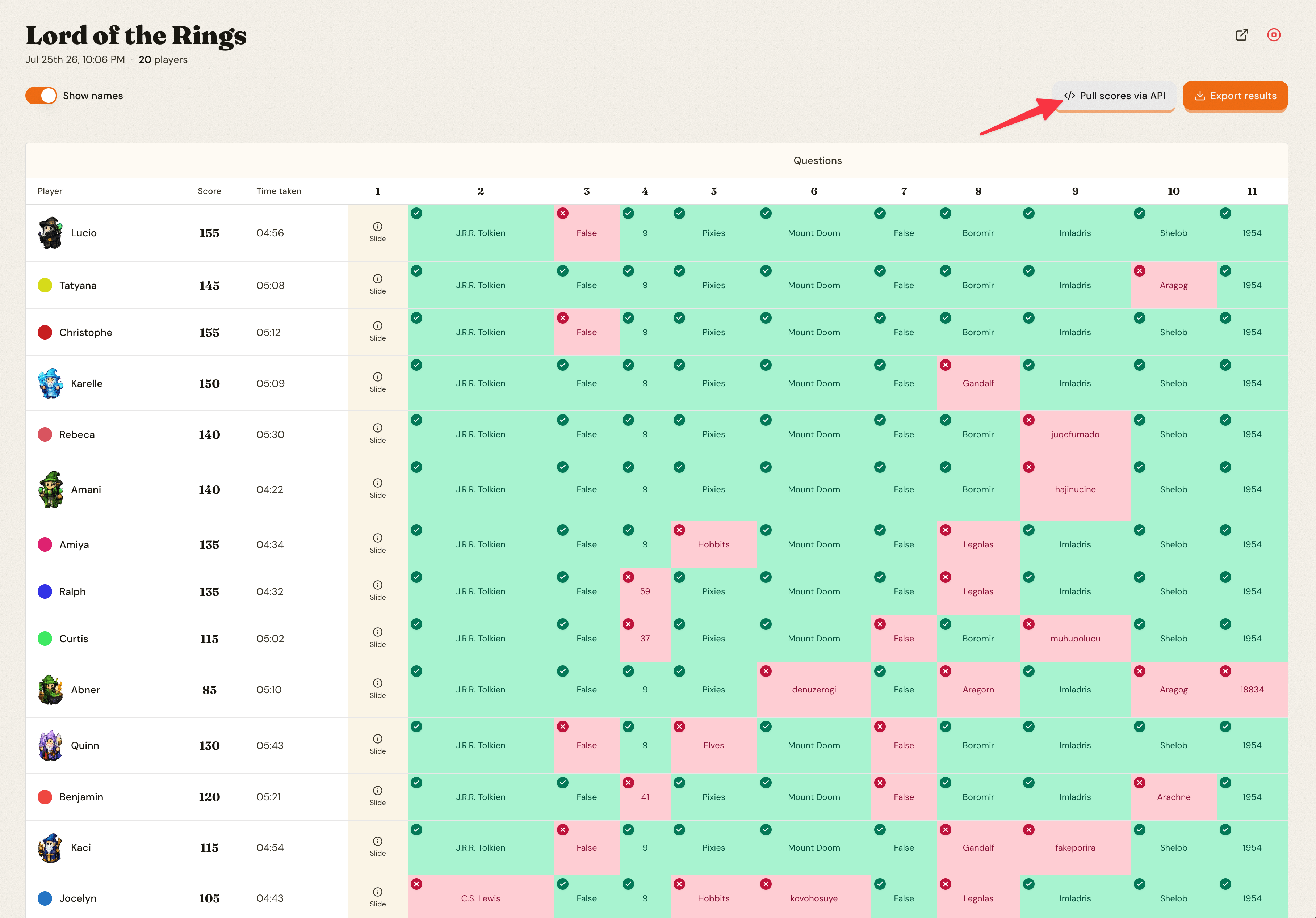
You can also grab a ready-made request from any game report: the Pull scores via API button shows the exact endpoint and an example request for that game.
Response
{
  "status": "IN_PROGRESS",
  "title": "Lord of the Rings",
  "datePlayed": "2026-07-25T21:06:54.115Z",
  "gameType": "RACE",
  "players": [
    { "name": "Lucio", "score": 155, "brains": null, "coins": null, "finishedPlace": 7, "timeTakenSeconds": 296, "position": 1 },
    { "name": "Tatyana", "score": 145, "brains": null, "coins": null, "finishedPlace": 10, "timeTakenSeconds": 308, "position": 2 },
    { "name": "Christophe", "score": 155, "brains": null, "coins": null, "finishedPlace": 13, "timeTakenSeconds": 312, "position": 3 },
    ...
  ]
}
statusisIN_PROGRESSwhile the game is running (scores are current, not final) andFINISHEDonce the host ends it.gameTypeisRACE,SCOREorPARTY, and decides what the standings are based on.playersis sorted by standing, in the same order as the live leaderboard and the game report.finishedPlaceis the order the player finished (1 = first), whether by crossing the finish line or by completing all of their questions, ornullif they never finished. Because both count, the numbers can disagree with the standings;positionis the ranking to use.positionis the overall standing including players who did not finish.timeTakenSecondsis how long the player took to finish, in seconds from the game starting (host pauses excluded). It isnulluntil the player finishes.scoreis the points total. In race games the standing is decided by finish order rather than points, so rank byposition, notscore.brainsandcoinsare the player's party totals, ornulloutside party games.
Party games
In party games the most brains wins, with coins and then points breaking ties, so position can rank a player above someone with a higher score. The board has no finish line, so finishedPlace and timeTakenSeconds are always null.
Bonus brains are awarded when the host ends the game, so the standings can still change between the last IN_PROGRESS response and the FINISHED one. Read the final result once status is FINISHED.
Errors
401: missing or invalid API key.403: your account's API access period has ended. Contact us to renew.404: your account has no game (running or finished) with that access code.
Polling the scores endpoint every 10 to 30 seconds during a live game is fine.